Donate Delphi Team

Saturday, October 15, 2016

E-Payment Integrator 6.0.5962 (D6-XE10.1)

E-Payment Integrator Delphi Edition

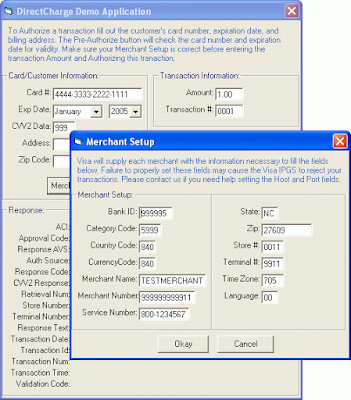
E-Payment Integrator includes components for Credit Card & Electronic Check (ACH) processing & 3-D Secure Authorization via major Internet payment gateways. It includes E-Commerce components trusted by thousands of developers worldwide. E-Payment Integrator alleviates the complexity of integrating electronic payment support by providing components with an intuitive interface for handing credit card & eCheck transactions. There is no need for developers to learn complicated socket programming or security implementation. By using the E-Payment Integrator, developers are able to target and develop for any currently supported payment gateway.

IBiz E-Payment Integrator Delphi Edition

Native Delphi VCLs for Borland Delphi with no external dependencies. It features the same trustworthy components that come with other editions, available as native Delphi VCLs for real Delphi performance.

 Image

 Download


Features

Credit Card & eCheck Components - Components for Credit Card processing and e-Checks included in a comprehensive, e-commerce suite
128-bit Strong SSL Security - Built on top of the IP*Works! SSL secure communications framework - trusted by...

Download: E-Payment Integrator 6.0.5962 (D6-XE10.1)

TMS Security System v.2.7.0.0.0 D6-XE10 Full Source

Feature overview

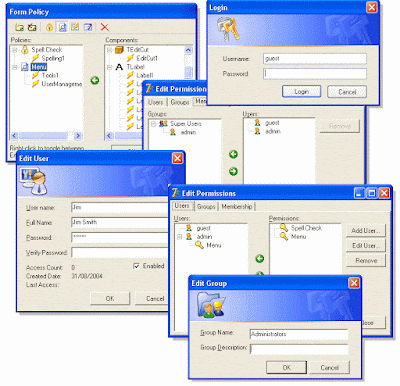
The TMS Security System facilitates the definition of user rights on a menu or form level. In its user management features the TMS Security System relies on user/group profiles stored in a database. 

The users can be grouped and can inherit rights in this way. Thereby you can integrate a highly sophisticated and close grained user management that closes all potential loopholes via shortcuts with minimal effort. Only if the user has been granted the specific right by the administrator he can see or use the specific function assigned by the administrator.

The administrator can configure the rights at run-time thereby preventing a restart of the program when changing assignments. For doing so he can use an easy to handle, intuitive GUI that enables the administrator to create new users or to group or delete them directly from the application.


View TMS Security System
Download: TMS Security System v.2.7.0.0.0 D6-XE10 Full Source

WebBrowers & HtmlViewers collection

AsyncCalls – Asynchronous function calls

With AsyncCalls you can execute multiple functions at the same time and synchronize them at every point in the function or method that started them. This allows you to execute time consuming code whos result is needed at a later time in a different thread. While the asynchronous function is executed the caller function can do other tasks.

Works with Delphi 5 – 10.1 Berlin. (Win32, Win64)

Download:

Link 1: AsyncCalls – Asynchronous function calls
Link 2: AsyncCalls – Asynchronous function calls

TVideoGrabber SDK 10.4.1.2

TVideoGrabber Video SDK


 TVideoGrabber


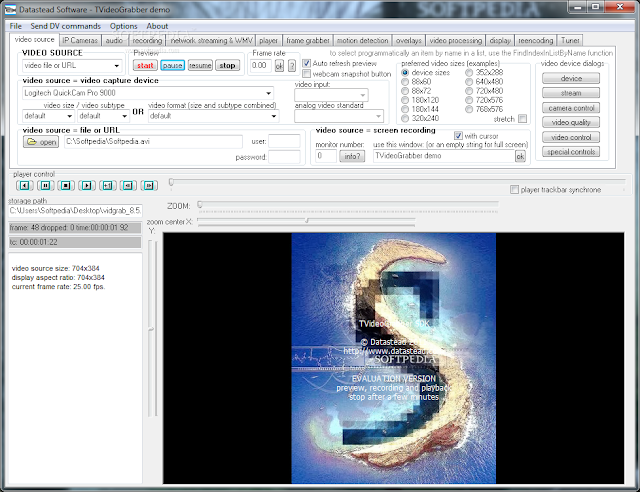
TVideoGrabber is a video capture/media player SDK for development of C#, VB, C++, Delphi, C++Builder, and ActiveX-compatible applications.
TVideoGrabber captures and records video and audio streams from video capture devices supplied with a DirectShow driver like USB webcams, USB analog capture devices, HD PCI cards, desktop, as well as from set of bitmaps used as video source.
After installing the Multipurpose DirectShow Encoder Filter, it is possible to record or stream in many formats without having to install third-party DirectShow compression codecs. It is possible to stream audio/video directly to the network, or through media servers, or to merge several clips into a single one, split a clip into smaller clips and transcode them to different formats.
After installing the RTSP/RTMP DirectShow Source Filter, it is possible to receive, record and capture RTSP IP cameras, RTMP media servers and other streaming sources. The RTSP filter is able to render and save at the same time the streaming source to a file without transcoding, and save to new files on the fly without loosing frames.
When the RTSP/RTMP DirectShow source filter is installed TVideoGrabber supports also capture devices with a hardware encoder like the Avermedia Live Gamer portable, BlackMagic Decklink, Hauppauge Colossus, etc...
TVideoGrabber is also an advanced media player that lets play audio/video clips at their normal speed, faster, slower, forward and backward, one by one or through a playlist.
It is possible to capture frames, perform text/graphic overlays over the video frames or only over the video window, during preview, recording or playback, perform PIP video from another TVideoGrabber component, apply video processing like rotation, cropping and more.
Designed to be easy and comprehensive to use, TVideoGrabber will help you to save time, money and effort to include video and/or audio capabilities in your project.
Several instances of TVideoGrabber can run concurrently, e.g. to display a video capture window and a media player window on the same form, or to run several cameras concurrently on the same form.
The package includes demo projects showing how to implement the simplest as well as the most advanced features, with only a few lines of code.

AutoUpgrader 5.0.2 Pro Full Source Code

AutoUpgrader 5.0.2 Pro Full Source Code (Recompiled to Delphi 10 Seattle and Delphi 10.1 Berlin by DelphiTools)

Description:

The AutoUpgrader component is able to automatically upgrade from the Web any Delphi/BCB application. The AutoUpgrader will check your website out for the newest releases of your software and, if the newest versions is available - it will download and upgrade your application "on the fly", without restarting of computer and even without manual program restart.


Download:
Link 1: AutoUpgrader 5.0.2 Pro Full Source Code
Link 2: AutoUpgrader 5.0.2 Pro Full Source Code


IBObjects 5.7.13 Build 2411 Full Source

BDE switch between the IBO in a short time without losing the ability to last
Low volume library 500 to 1200 KB
Installation and easy distribution
No need for libraries other side
2 to 4-fold increase efficiency
Transaction data quickly even on heavy Dytasthay
Virtual TDataset compatibility with standard data controls
More than 45 controls, Jtstjvgr, grade, toolbars and dialogue are optimized for maximum client-server applications
Support for Delphi, CPPBuilder from version 5 onwards and supports all Firebird and InterBase logs


 IBOBject Homepage

Password file (s): Password: Www.downloadly.ir

Download:
Link 1: IBObjects 5.7.13 Build 2411 Full Source
Link 2: IBObjects 5.7.13 Build 2411 Full Source

UniDAC.v.6.3.13 - Universal Data Access Components Free

Universal Data Access Components (UniDAC) is a library of components that provides direct access to multiple databases from Delphi, C++Builder, Lazarus

 Download UniDAC

* Download: UniDAC.v.6.3.13 - Universal Data Access Components 

AlphaControls.v11.17.Stable.(D5&D10.1Berlin)-(CB6&Builder10.1Berlin).OnlyDCUs

13.10.2016 AlphaControls v11.17 Stable released

 Alpha Control


* Improved initializing of the TsDecimalSpinEdit when the DecimalPlaces property is changed
* Improved drawing of the TsImage if Transparent property is False
* Improved showing of popup forms by the ShowPopupForm procedure
* Improved scaling of TsSpeedButton and TsButton when dropdown arrow is visible
* Improved painting of the TsCombobox component without skins
* Switching of the ScaleMode property is improved visually
* Solved issue with drawing of a selected item with big text in the TsTreeView component
* Solved problem with scrolling of the TsSkinSelector component by keyboard
* Solved issue with empty form showing when ExtendedBorders used
* Solved problem with hotkeys when TsComboboxEx is focused
* Added support of the TSearchBox component
* Added semitransparent painting of the disabled TsSlider components and caption of the TsGroupBox component

Download:  13.10.2016 AlphaControls v11.17 Stable released


Wednesday, September 21, 2016

HowTo: Install Firebird/Interbase with PHP on Windows. A step-by-step tutorial.


  • Copy C:\firebird\bin\fbclient.dll to your C:\windows\system32 directory and rename the file to gds32.dll
  • Copy php_interbase.dll from your php\ext directory to the C:\windows\system32 directory.
  • Copy libeay32.dll and ssleay32.dll from your php directory to the C:\windows\system32directory.
  • Edit your php.ini, un-comment the line
    extension=php_interbase.dll
    (you have to remove the semicolon from that line).
  • Restart your webserver (Apache).